
Fee Types
The Aurora Behaviours module supports six distinct fee types. Each can be configured independently for your programme. The table below summarises how each fee works and provides an illustrative example.
| Fee Type | How It Works | Example |
|---|---|---|
| Fixed Fee | A single, flat amount charged when a qualifying transaction occurs. The same amount is always applied regardless of the transaction value. | A £1.50 fee applied every time a cardholder makes an ATM withdrawal. |
| Variable Fee | A percentage calculated against the billing amount of the transaction. The fee rises and falls in proportion to the transaction value. | A 1.5% fee on a £200 purchase results in a £3.00 fee. |
| Minimum Fee | Used alongside a Variable Fee. If the calculated variable fee falls below this floor value, the minimum fee is charged instead. | Variable fee calculates at £0.20, but the minimum is £0.50, so £0.50 is charged. |
| Maximum Fee | Used alongside a Variable Fee. If the calculated variable fee exceeds this ceiling value, the maximum fee is charged instead. | Variable fee calculates at £18.00, but the maximum is £10.00 so £10.00 is charged. |
| FX Mark-Up Fee | A percentage applied to the currency conversion rate before the revised billing amount is calculated. This adjusts the effective exchange rate used for the transaction. This calculation must be completed before any subsequent Variable Fee is calculated in order that the Variable Fee percentage is applied on the correct value of billing amount. | A 2% FX mark-up on a EUR/GBP conversion of 0.85 results in an adjusted rate of 0.867. |
| Exemptions | Exemptions can be applied to the Fixed, Variable, Minimum and Maximum fees whereby a fee is not applicable until the defined condition(s) are met. | The first 3 ATM transactions per month are free; from the 4th transaction onwards the configured fee applies. |
Fixed Fee
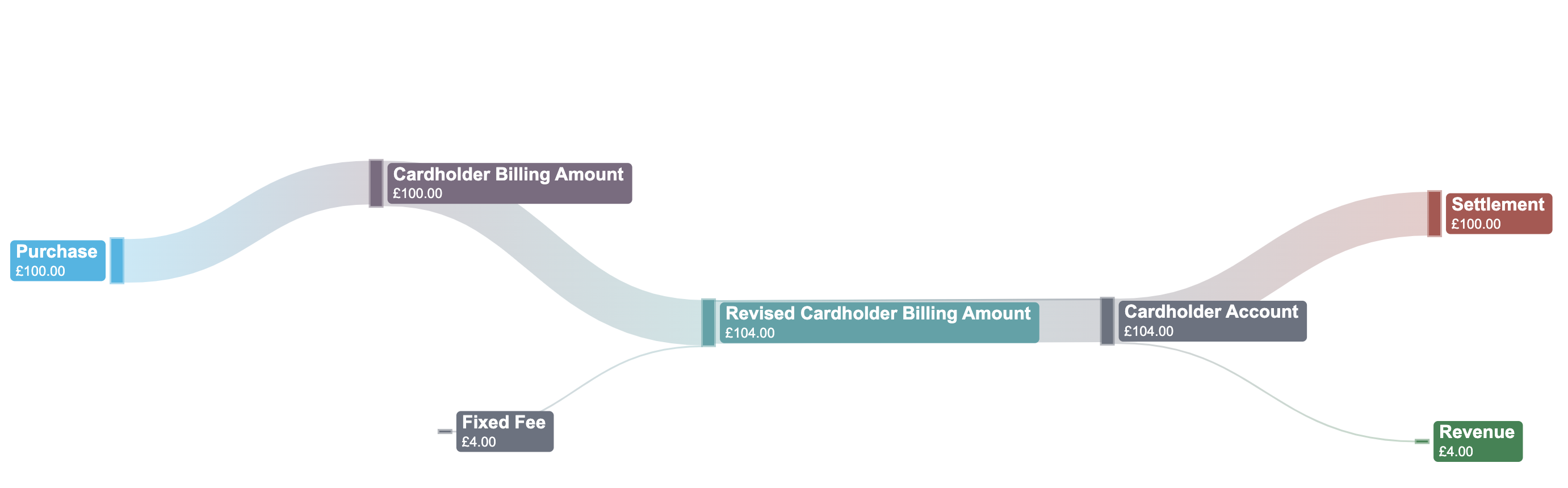
CLOWD9 will apply the fixed fee value and calculate the revised_cardholder_billing_amount for your decision (Off Ledger) or CLOWD9 (On Ledger).
When the clearing record is received, the same process will apply. As above, your Customer will be debited £104.00 which is:
- £100.00 for the purchase and will reflect the cardholder_billing_amount value received from the Network. This is amount to be settled to the Network (plus or minus Interchange).
- £4.00 for the fixed fee amount which is then your internal revenue.
Fixed Fee Example
        "fees": [
            {
                "amount": 400,
                "type": "fixed_fee"
            }
        ],
        "fees_amount": 400,
Variable Fee
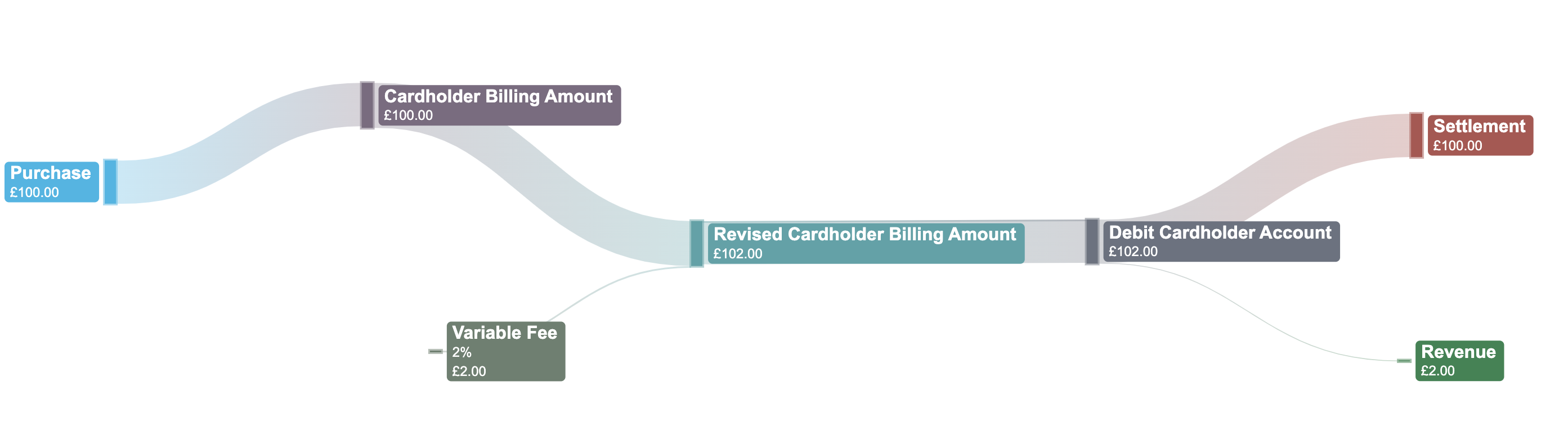
Using the cardholder_billing_amount provided by the Network, CLOWD9 will use the Variable Fee % configured to calculate the fee value.
Variable Fee Example
        "fees": [
            {
                "amount": 200,
                "type": "variable_fee"
            }
        ],
        "fees_amount": 200,
Variable Fee (Minimum Amount)
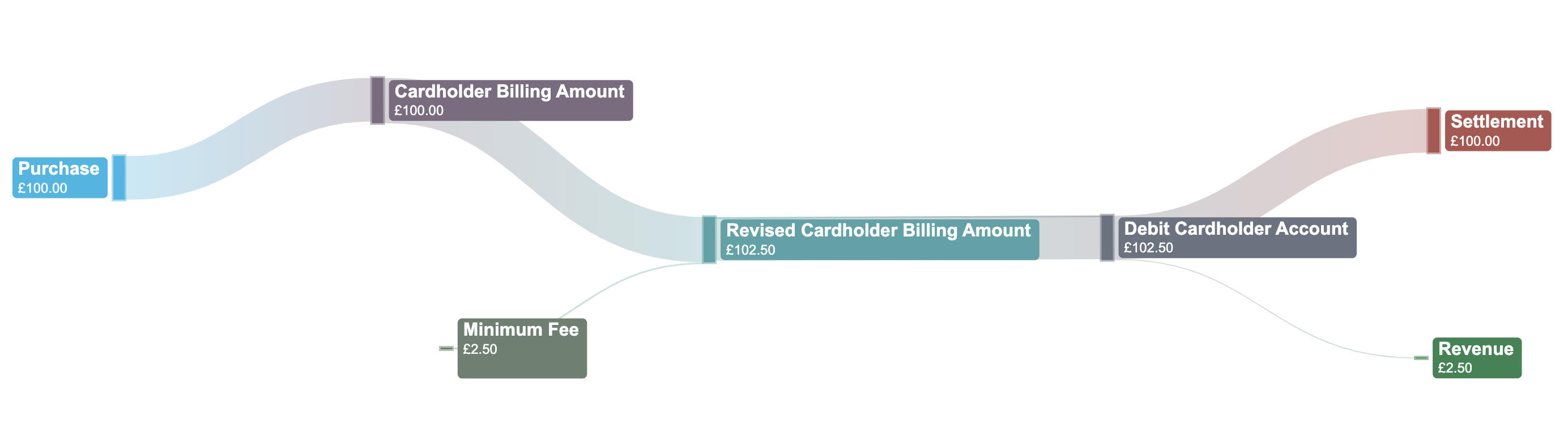
You can configure the Minimum and/or Maximum Fee when using the Variable Fee. This allows you to always have a Minimum value that is charged to your Customer.
Where the Variable Fee value is less than the Minimum Fee amount, this fee will be applied for example:
- cardholder_billing_amount is £100.00
- Variable Fee is 2% and therefore the amount would be £2.00, calculated by 100*2%
- The Minimum Fee is £2.50
- In this case, the Minimum Fee is applied
Minimum Amount Example
        "fees": [
            {
                "amount": 250,
                "type": "minimum_fee"
            }
        ],
        "fees_amount": 250,
Variable Fee (Maximum Amount)
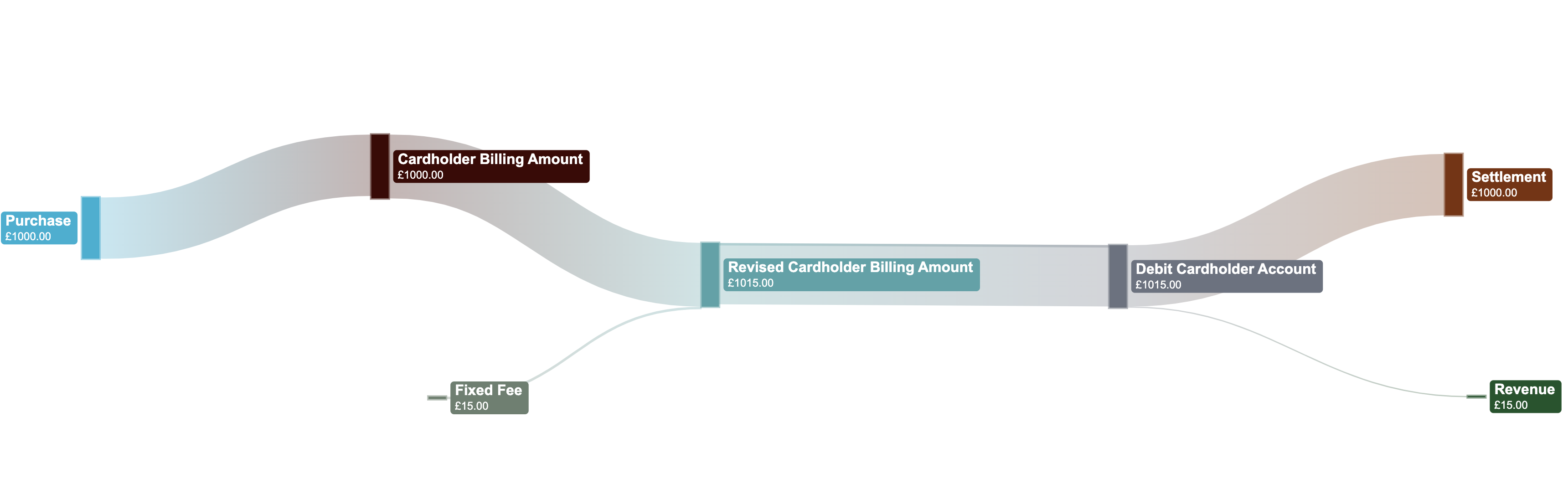
As with the the Minimum Fee, you can configure a Maximum Fee when using the Variable Fee. This allows you to always have a Maximum amount that is charged to your Customer.
Where the Variable Fee value is greater than the Maximum Fee amount, this fee will be applied for example:
- cardholder_billing_amount is £1000.00
- Variable Fee is 2% and therefore the amount would be £20.00, calculated by 1000*2%
- The Maximum Fee is £15.00
- In this case, the Maximum Fee is applied
        "fees": [
            {
                "amount": 15,
                "type": "maximum_fee"
            }
        ],
        "fees_amount": 15,
FX Markup Fee
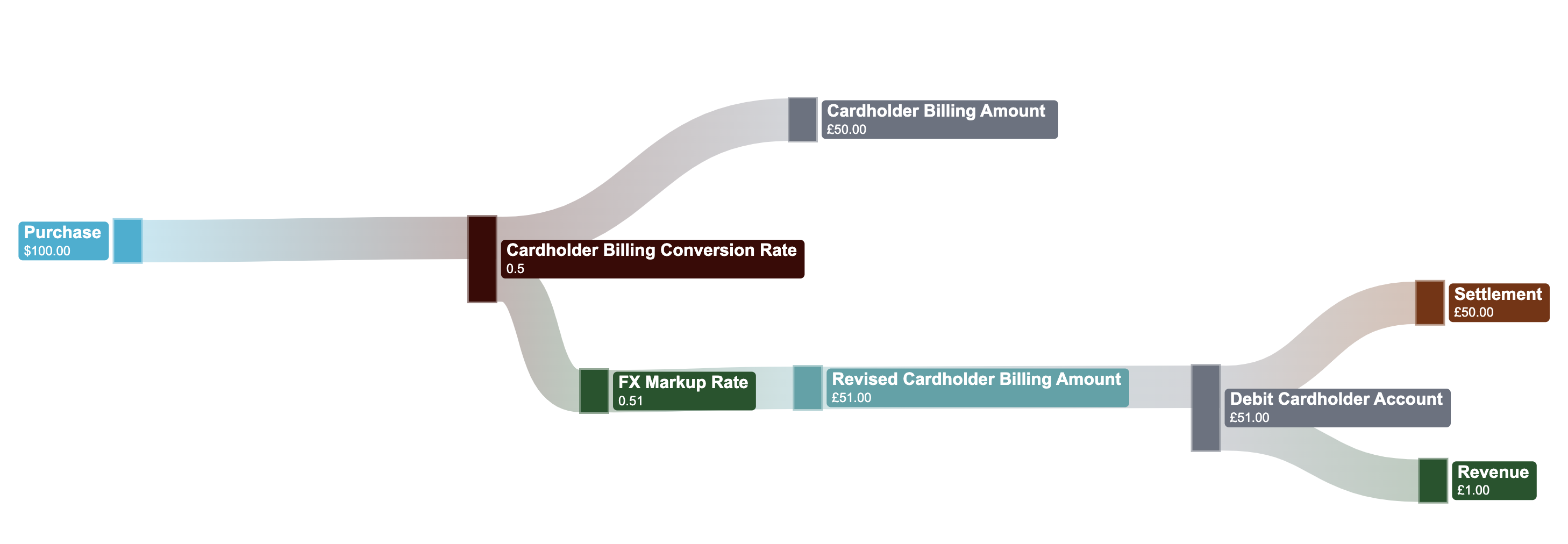
The fx_markup_fee is configured using a %, for example 5%. The fx_markup_fee and revised_cardholder_billing_amount is calculated as follows:
- The revised_cardholder_billing_conversion_rate to be used is calculated as follows:
- (Cardholder Billing Conversion Rate x FX Markup Rate) + Cardholder Billing Conversion Rate
- (0.5x5%)+0.5
- 0.025+0.5
- revised_cardholder_billing_conversion_rate is 0.525
- The revised_cardholder_billing_amount is calculated as follows:
- transaction_amount x revised_cardholder_billing_conversion_rate
- 10000 x 0.525
- The revised_cardholder_billing_amount will be 5250
- fx_markup_fee is calculated as follows:
- revised_cardholder_billing_amount - cardholder_billing_amount
- 5250 - 5000 = 250
- fx_markup_fee = 250
        "fees": [
            {
              "type": "fx_markup_fee",
              "revised_cardholder_billing_conversion_rate:"0.525",
              "amount": 250
            }
        ],
        "fees_amount": 250,
Exemptions
You may like to offer a number of transactions or set value of transactions before a Fee is incurred, for example:
- Up to £300.00 or 5 ATM Withdrawals in a day without a fee, each subsequent ATM withdrawal incurs:
- £2.00 fixed fee, and or
- Variable Fee (minimum / maximum combination optional).
- Up to 20 POS transactions in a week without a fee, each subsequent POS transaction incurs:
- £2.00 fixed fee, and or
- Variable Fee (minimum / maximum combination optional).
The count of number or value of transactions before a Fee is incurred is based only on previously approved transactions.
Configuration of the Fees would be the same; however Exemption management will be additional configuration settings.
The Exemption could be a introductory welcome offer (i.e. value, number without a fee), or could be reset at specified period for example, daily, weekly, monthly etc.
Non Financial and Decline Fees
You may wish to charge a fee where the transaction has a 0.00 value and / or as a result of the transaction being declined. The Networks will not be provide a clearing record to CLOWD9 and therefore the fee is to be applied to the actual and available Customer balance as part of the authorization flow.
Non Financial
Non-financial transactions include administrative actions that do not move funds. Common examples include:
- Balance Inquiry
- PIN Change via the ATM
- PIN Unblock via the ATM
- Address Verification
- Account Name Inquiries
Fees are fully configurable and can be set individually based on your program's requirements.
Decline Fees
Decline fees are categorized into the following:
| Decline Type | Fee Application Logic |
|---|---|
| Insufficient Funds | Transaction exceeds the available balance. For Off Ledger programs, the fee will be included (if configured) in the Network Confirmation webhook. |
| Unsuccessful Verification | Status other than active, incorrect PIN, CVV2, velocity / limit breaches or not permitted to the Cardholder. |
Account Balance Protection Policy:
For On-Ledger programs, CLOWD9 will not apply non-financial or decline fees if doing so would result in a negative account balance. We do not "queue" these fees for future collection. If you wish to recover these fees once funds become available, please use the Decrease Balance API to perform a manual adjustment.
Updated 5 months ago