
Out of Band (OOB) Authentication & Response
Overview
Out-of-Band authentication is a 3D Secure challenge method in which the Cardholder verifies a transaction through the Program Manager’s application, separately from the Merchant’s checkout or challenge screen.
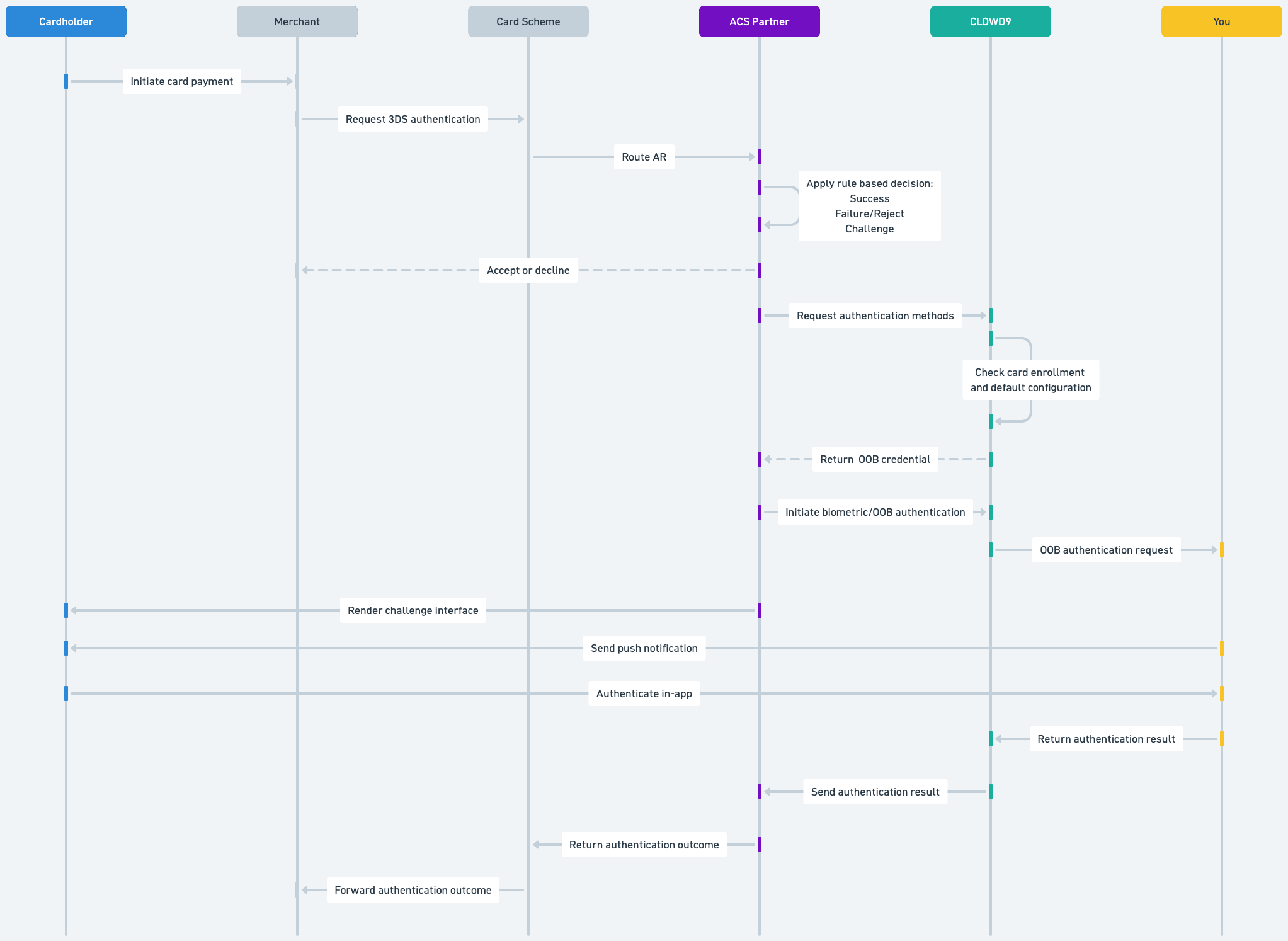
During an OOB challenge, CLOWD9 acts as the integration layer between Apata, the Access Control Server (ACS), and the Program Manager. CLOWD9 sends the authentication request to the Program Manager and returns the authentication result to Apata.
OOB can be configured as the as the primary method, with another method such as OTP configured as a fallback or secondary method.
Prerequisites
Before OOB authentication can be used:
- OOB must be enabled for the applicable product
- The card must be enrolled for the biometric or OOB authentication method
- The product’s default and any applicable fallback authentication methods must be configured
- The Program Manager must provide CLOWD9 with an endpoint for receiving OOB authentication requests
- The Program Manager’s application must be able to notify the Cardholder, perform the authentication and return the result to CLOWD9
CLOWD9 uses the card’s existing enrolment and product configuration to determine the registered authentication type. CLOWD9 does not contact the Program Manager in real time to discover which authentication methods are available.
Authentication decision
When a Merchant initiates 3D Secure authentication, the Card Scheme routes the request to Apata (ACS Partner). Apata applies the configured authentication and risk rules and produces one of the following outcomes:
- Success: The Cardholder is authenticated without an additional challenge. Apata returns the successful authentication outcome to the Merchant, which may continue to payment authorisation
- Fail/Reject: Apata returns an unsuccessful authentication outcome to the Merchant. The Merchant determines whether to end the transaction or handle it according to its own rules
- Challenge: 3D Secure authentication is required, and Challenge screens are shown to the cardholder
Endpoint configuration
The Program Manager must provide CLOWD9 with the endpoint used to deliver OOB authentication requests. This endpoint is configured during the implementation process.
If the endpoint needs to be replaced after implementation, the Program Manager must follow the CLOWD9 Change Request process.
Important distinction
Successful OOB authentication completes the 3D Secure authentication stage. It does not authorise the payment itself.
After receiving a successful authentication result, the Merchant may continue with the separate payment authorisation request.
OOB Authentication Request
Authenticate Request:
| Field Name | Description | Format |
|---|---|---|
| client_id | Client identifier as per the GUID generated by CLOWD9. | String |
| card_id | The GUID of the card relating to the purchase. | String |
| customer_id | The GUID associated with the Customer as generated by CLOWD9. | String |
| sp_transaction_id | Unique identifier associated to the authorization request. | String |
| ds_transaction_id | Directory server unique identifier associated to the transaction. | String |
| card_acceptor_id | The ID of the merchant. | String |
| card_acceptor_name | The Merchant name. | String |
| card_acceptor_country | The numeric ISO country code associated with the Merchant. | String |
| transaction_category | Type of transaction for which authentication is requested. Values are: “payment" - Spend | String |
| transaction_currency_code | Numeric ISO currency code of the transaction. | String |
| transaction_currency_exponent | Minor units of the transaction currency. | String |
| transaction_amount | Transaction amount in minor units of the transaction currency. | String |
| transaction_channel | Channel at which transaction was acquired through: "app": The transaction was initiated from a merchant app using a 3DS SDK. “browser”: The transaction was initiated from a web browser. “merchant-initiated”: The transaction was initiated asynchronously by the merchant directly with the user. | String |
| transaction_datetime | Date and time of the transactions. | Integer |
| challenged_datetime | Date and time when the end user was challenged. | Integer |
| challenge_expiry_window | Time window until the challenge is valid from challenged_datetime. | Integer |
| challenge_expiry_datetime | Date and time when the challenge expires. | Integer |
 {
    "client_id": "123e4567-e89b-12d3-a456-426614174000",
    "card_id": "123e4567-e89b-12d3-a456-426614174001",
    "customer_id": "123e4567-e89b-12d3-a456-426614174002",
    "sp_transaction_id": "123e4567-e89b-12d3-a456-426614174003",
    "ds_transaction_id": "123e4567-e89b-12d3-a456-426614174004",
    "card_acceptor_id": "5999",
    "card_acceptor_name": "Amazon",
    "card_acceptor_country": "826",
    "transaction_category": "payment",
    "transaction_currency_code": "978",
    "transaction_currency_exponent": "2",
    "transaction_amount": "10000",
    "transaction_channel": "browser",
    "transaction_datetime": 1728478766,
    "challenged_datetime": 1728478766,
    "challenge_expiry_window": 10,
    "challenge_expiry_datetime": 1728478776
}
Authentication Response
Authenticate Response:
| Field Name | Description |
|---|---|
| client_id | Client identifier as pr the GUID generated by CLOWD9. |
| card_id | The GUID of the card relating to the purchase. |
| customer_id | The GUID associated with the Customer as generated by CLOWD9. |
| sp_transaction_id | Unique identifier associated to the authorization request. |
| status | Status of the web hook request. Should carry a static value of “ok”. |
Succesful Example:
{
  "client_id" : "",
  "card_id" : "",
  "customer_id" : "",
  "sp_transaction_id" : "",
  "status" : "ok"
}
Fallback Example:
{
  "client_id" : "",
  "card_id" : "",
  "customer_id" : "",
  "sp_transaction_id" : "",
  "status" : "fallback"
}
Updated about 2 months ago